
Binding Card SDK for Android
Overview
The OSL Pay BindCard SDK (the "Binding Card SDK") provides a secure payment-card binding service for integrator apps.
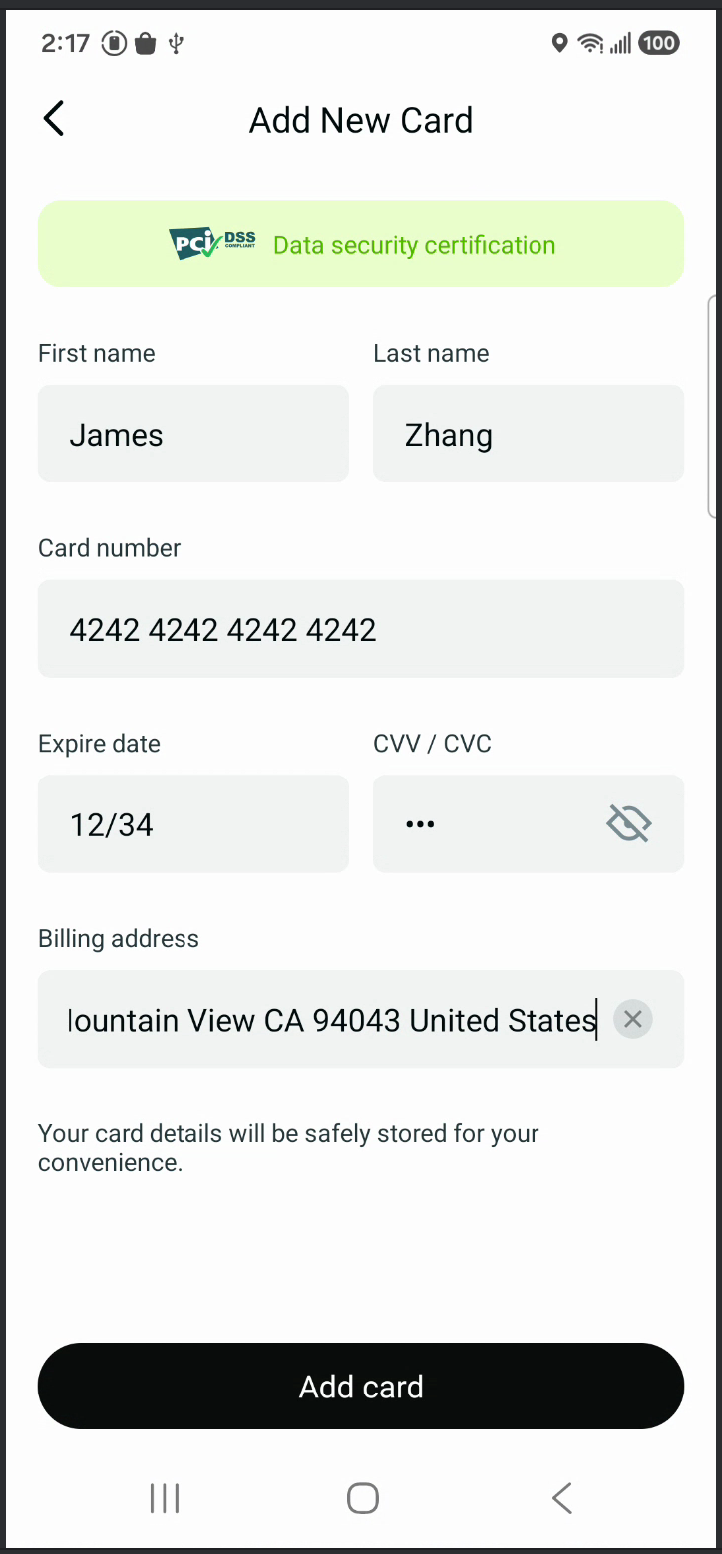
If your app is not PCI (Payment Card Industry) compliant, you must integrate the Binding Card SDK provided by OSL Pay. This approach aligns with industry compliance standards. You do not need to implement the card-binding UI or card-data storage; simply launch the SDK.
The Binding Card SDK exposes a single public capability: launching the card-binding flow. No advance initialization is required. After you call the binding method, the SDK initializes itself, validates the user identity, presents the card-binding UI, processes the result, and returns the final outcome through callbacks.
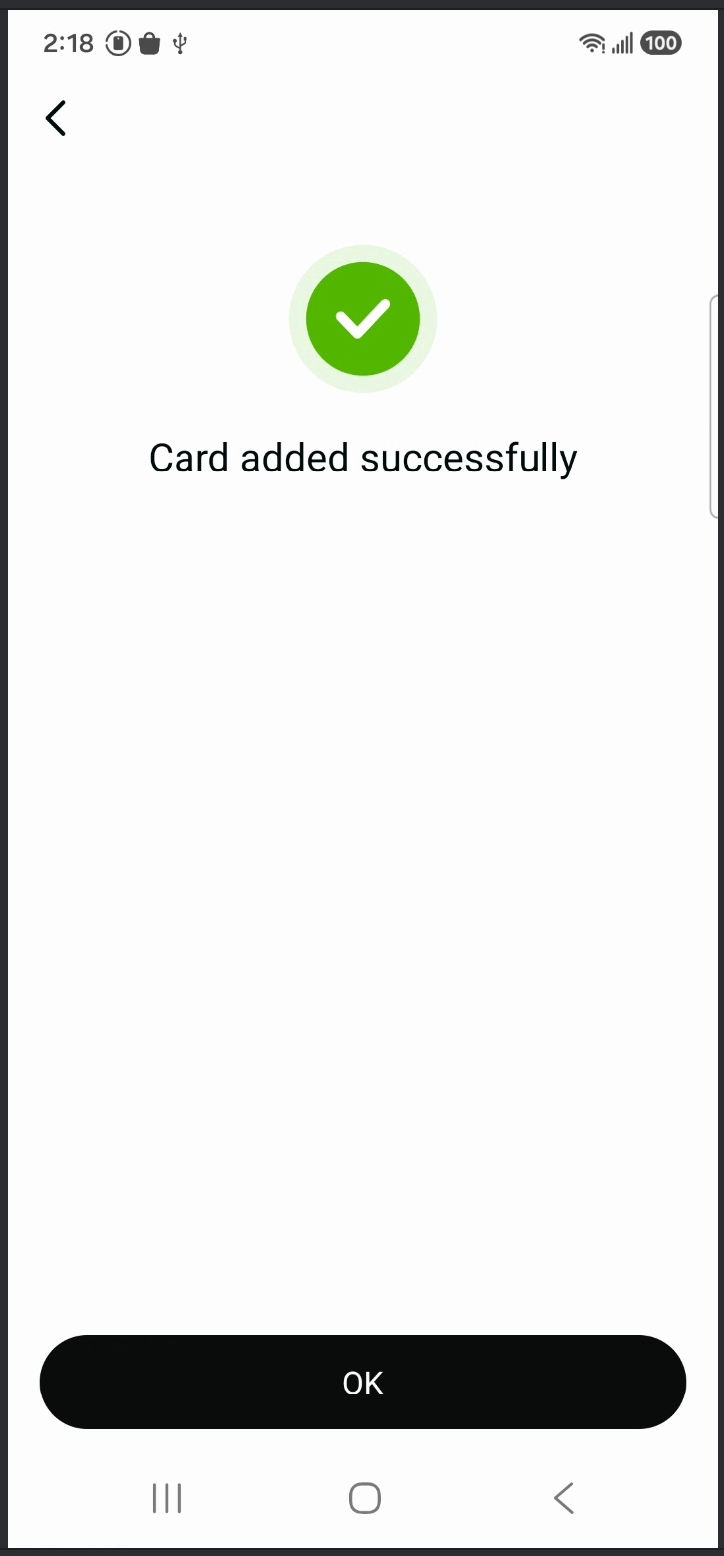
Product demonstration

Internal dependencies
The Binding Card SDK includes the proprietary OSL Pay Risk SDK (Risk SDK) to collect risk-control parameters. This library is supplied with the Binding Card SDK as a first-party AAR; all other dependencies are standard external dependencies.
Card-binding flow
The complete flow after the Binding Card SDK is launched is as follows:
Call bindCard()
      │
      ▼
Display a loading dialog (the SDK initializes automatically and validates accessToken)
      │
      ├── accessToken validation fails ──► invoke onTokenInvalid (terminal callback); end the flow
      │
      ▼ Validation succeeds
Display the card-binding screen (the user enters payment-card details)
      │
      ├── Binding fails ──► display a Toast and remain on the card-binding screen to retry; invoke onBindFailure when the user exits (terminal callback)
      │
      ▼ Binding succeeds
Display the successful-binding screen
      │
      ▼  The user taps Done / Back
Invoke onBindSuccess (terminal callback); end the flow- After you call the binding method, the SDK displays a loading dialog and completes SDK initialization and accessToken validation.
- If accessToken validation fails, the SDK invokes onTokenInvalid and ends the flow.
- After validation succeeds, the SDK opens the card-binding screen, where the user enters and submits payment-card details.
- On success, the SDK displays the successful-binding screen. On failure, it displays a Toast and keeps the user on the card-binding screen so they can correct the details and retry.
Integrate the OSL Pay BindCard SDK
1.SDK build environment
The OSL Pay BindCard SDK artifact is built in the following environment:
- id = "com.android.library", version.ref = "8.13.2"
- id = "org.jetbrains.kotlin.android", version.ref = "2.0.21"
- minSdk 24
- targetSdk 36
- compileSdk 36
- JavaVersion 11(sourceCompatibility / targetCompatibility = 11,jvmTarget = 11)
2.Add the OSL Pay BindCard SDK dependency
Add the following AAR files to the libs directory:
- OslBindCardSdk-release.aar, the OSL Pay BindCard SDK build artifact
- OslPayRiskSdk-release.aar, the proprietary Risk SDK required internally by the Binding Card SDK
Then configure build.gradle:
implementation fileTree(dir: 'libs', include: ['*.jar', '*.aar'])3.Add dependencies required by the OSL Pay BindCard SDK
// Official libraries
implementation "androidx.core:core-ktx:1.13.1"
implementation "androidx.appcompat:appcompat:1.7.0"
implementation "com.google.android.material:material:1.10.0"
implementation "androidx.constraintlayout:constraintlayout:2.1.4"
implementation "androidx.activity:activity:1.8.1"
implementation "androidx.activity:activity-ktx:1.8.1"
implementation "androidx.lifecycle:lifecycle-viewmodel-ktx:2.8.7"
implementation "androidx.lifecycle:lifecycle-livedata-ktx:2.8.7"
implementation "androidx.lifecycle:lifecycle-runtime-ktx:2.8.7"

// Third-party libraries
implementation("com.squareup.okhttp3:okhttp:4.12.0")
implementation("com.squareup.okhttp3:logging-interceptor:4.12.0")
implementation("com.squareup.retrofit2:retrofit:2.9.0")
implementation("com.squareup.retrofit2:converter-gson:2.9.0")
implementation 'com.google.code.gson:gson:2.13.2'

// Dependencies required by the internal Risk SDK
implementation "com.github.fingerprintjs:fingerprint-android:2.2.0"
implementation 'com.forter.mobile:fortersdk:3.0.10'
implementation("com.checkout:checkout-sdk-event-logger-android:1.0.1")
implementation("com.fingerprint.android:pro:2.10.0")
Configure the repositories:
dependencyResolutionManagement {
    repositoriesMode.set(RepositoriesMode.FAIL_ON_PROJECT_REPOS)
    repositories {
        google()
        mavenCentral()
        // Configure the repositories:
        maven { url 'https://jitpack.io' }
        maven { // Forter repository
            url "https://mobile-sdks.forter.com/android"
            credentials {
                username "forter-android-sdk"
                password "HvYumAfjVQYQFyoGsmNAefGdR84Esqig"
            }
        }
        maven { url = uri("https://maven.fpregistry.io/releases") } // Checkout repository
    }
}
4.Configure build.gradle
Enable ViewBinding:
buildFeatures {
    viewBinding = true // Enable ViewBinding
}
Configure Java Version:
compileOptions {
    sourceCompatibility JavaVersion.VERSION_11
    targetCompatibility JavaVersion.VERSION_11
}
kotlinOptions {
    jvmTarget = '11'
}
5.SDK permissions
The OSL Pay BindCard SDK declares the following permissions:
<uses-permission android:name="android.permission.ACCESS_NETWORK_STATE" />
<uses-permission android:name="android.permission.INTERNET" />
6.Obfuscation configuration
The OSL Pay BindCard SDK depends on Retrofit and OkHttp. Add the following obfuscation rules:
# for OkHttp
# JSR 305 annotations are for embedding nullability information.
-dontwarn javax.annotation.**

# Animal Sniffer compileOnly dependency to ensure APIs are compatible with older versions of Java.
-dontwarn org.codehaus.mojo.animal_sniffer.*

# OkHttp platform used only on JVM and when Conscrypt and other security providers are available.
# May be used with robolectric or deliberate use of Bouncy Castle on Android
-dontwarn okhttp3.internal.platform.**
-dontwarn org.conscrypt.**
-dontwarn org.bouncycastle.**

# for Retrofit
# Retrofit does reflection on generic parameters. InnerClasses is required to use Signature and
# EnclosingMethod is required to use InnerClasses.
-keepattributes Signature, InnerClasses, EnclosingMethod

# Retrofit does reflection on method and parameter annotations.
-keepattributes RuntimeVisibleAnnotations, RuntimeVisibleParameterAnnotations

# Keep annotation default values (e.g., retrofit2.http.Field.encoded).
-keepattributes AnnotationDefault

# Retain service method parameters when optimizing.
-keepclassmembers,allowshrinking,allowobfuscation interface * {
    @retrofit2.http.* <methods>;
}

# Ignore annotation used for build tooling.
-dontwarn org.codehaus.mojo.animal_sniffer.IgnoreJRERequirement

# Ignore JSR 305 annotations for embedding nullability information.
-dontwarn javax.annotation.**

# Guarded by a NoClassDefFoundError try/catch and only used when on the classpath.
-dontwarn kotlin.Unit

# Top-level functions that can only be used by Kotlin.
-dontwarn retrofit2.KotlinExtensions
-dontwarn retrofit2.KotlinExtensions$*

# With R8 full mode, it sees no subtypes of Retrofit interfaces since they are created with a Proxy
# and replaces all potential values with null. Explicitly keeping the interfaces prevents this.
-if interface * { @retrofit2.http.* <methods>; }
-keep,allowobfuscation interface <1>

# Keep inherited services.
-if interface * { @retrofit2.http.* <methods>; }
-keep,allowobfuscation interface * extends <1>

# With R8 full mode generic signatures are stripped for classes that are not
# kept. Suspend functions are wrapped in continuations where the type argument
# is used.
-keep,allowoptimization,allowshrinking,allowobfuscation class kotlin.coroutines.Continuation

# R8 full mode strips generic signatures from return types if not kept.
-if interface * { @retrofit2.http.* public *** *(...); }
-keep,allowoptimization,allowshrinking,allowobfuscation class <3>

# With R8 full mode generic signatures are stripped for classes that are not kept.
-keep,allowoptimization,allowshrinking,allowobfuscation class retrofit2.Response
Usage
1.SDK method overview
The Binding Card SDK exposes only one business method:
- Card binding: com.osl.pay.bindcard.sdk.OslPayBindCardSDK#bindCard
com.osl.pay.bindcard.sdk.OslPayBindCardSDK#init method is for internal SDK use only. Do not call it from your app.
2.Launch card binding
The Binding Card SDK does not require advance initialization. Call bindCard directly to launch the card-binding flow. All parameters except activity and accessToken are optional and do not affect card binding when omitted.
Example:
OslPayBindCardSDK.bindCard(
    // For development and testing, pass OslPayBindCardSDK.ENVIRONMENT_SANDBOX;
    // For production, pass OslPayBindCardSDK.ENVIRONMENT_PROD;
    // OslPayBindCardSDK.ENVIRONMENT_TEST is for internal testing and is not externally accessible.
    environment = OslPayBindCardSDK.ENVIRONMENT_SANDBOX,
    activity = this,                 // FragmentActivity; required
    accessToken = accessToken,       // User-identity validation token; required and single-use
    language = Language.LANGUAGE_EN, // Optional; defaults to the app's current language
    businessType = BusinessType.BUY, // Optional; defaults to BUY
    suppressedErrorCodes = null,     // Optional; list of error codes to suppress
    suppressErrors = null,           // Optional; whether to suppress all error codes
    onTokenInvalid = { errorCode, errorMessage ->
        // accessToken validation failure callback (terminal)
    },
    onBindSuccess = { cardId ->
        // Card-binding success callback (terminal)
    },
    onBindFailure = { errorCode, errorMessage ->
        // Card-binding failure callback (terminal)
    },
    onToastShow = { errorCode, errorMessage ->
        // Immediate callback for a suppressed error; handle the error in your app
    },
)
3.Parameter reference
bindCard parameters:
| Parameter | Required | Description |
|---|---|---|
activity | Yes | The host FragmentActivity that launches the card-binding flow. |
accessToken | Yes | User-identity validation token. It is single-use; retrieve a new token before the next bindCard call. |
environment | No | Runtime environment. Defaults to ENVIRONMENT_PROD. Available values: ENVIRONMENT_SANDBOX (Sandbox) and ENVIRONMENT_TEST (internal testing; not externally accessible). |
language | No | Language enum used by the SDK to select the display language. Defaults to the app's current language. See Supported SDK languages for valid values. |
businessType | No | Business-type enum. Supported values: BUY and SELL. Defaults to BUY. |
suppressedErrorCodes | No | List of error codes to suppress. When an API error code matches this list, the SDK does not display a Toast. Instead, it returns the error through onToastShow for your app to handle. |
suppressErrors | No | Whether to suppress all error codes. When true, the SDK does not display a Toast for any API error and returns the error through onToastShow. |
onTokenInvalid | No | Invoked when accessToken validation fails (terminal callback). |
onBindSuccess | No | Invoked when card binding succeeds; returns the bound cardId (terminal callback). |
onBindFailure | No | Invoked when card binding fails or the user exits the flow (terminal callback). |
onToastShow | No | Immediate callback for suppressed errors. Return the error to your app for handling. |
4.Callback behavior
The Binding Card SDK provides two callback types:
- Terminal callbacks: onTokenInvalid,onBindSuccess,onBindFailure are invoked only when the card-binding flow ends. At most one is invoked in a card-binding session.
- Immediate callback: onToastShow is invoked as soon as a suppressed error occurs and may be followed by a terminal callback in the same session.
5.Error-handling strategy
When an API request returns an error, the SDK applies the configured suppression behavior:
| Scenario | SDK behavior |
|---|---|
| No suppression configured | The SDK displays a Toast with the error message. |
Error code matches suppressedErrorCodes | The SDK does not display a Toast and invokes onToastShow for your app to handle. |
suppressErrors = true | Suppresses all error codes. The SDK does not display a Toast and invokes onToastShow for your app to handle. |
Supported SDK languages
The SDK supports the following languages. Use the corresponding enum for the language parameter:
| Enum | Language code / identifier | Language name |
|---|---|---|
LANGUAGE_AR | ar-SA | بالعربية |
LANGUAGE_CN | zh-CN | 简体中文 |
LANGUAGE_TW | zh-TW | 繁體中文 |
LANGUAGE_DE | de | Deutsch |
LANGUAGE_EN | en | English |
LANGUAGE_ES_ES | es-ES | Español |
LANGUAGE_ES_AR | es-AR | Español (Internacional) |
LANGUAGE_FR | fr | Français |
LANGUAGE_ID | id | Bahasa Indonesia |
LANGUAGE_IT | it | Italiano |
LANGUAGE_JA | ja | 日本語 |
LANGUAGE_PL | pl | Polski |
LANGUAGE_PT_BR | pt-BR | Português (Brasil) |
LANGUAGE_PT_PT | pt-PT | Português (Portugal) |
LANGUAGE_RU | ru | русский |
LANGUAGE_UK | uk | Українська |
LANGUAGE_UZ | uz | oʻzbek |
LANGUAGE_VI | vi | Tiếng Việt |
Official reference documentation
- Sandbox testing documentation: Sandbox Test Guide
- Retrieve accessToken through the OpenAPI endpoint: Generate AccessToken
Updated 3 months ago