
Binding Card SDK for Web
This SDK is used to collect users’ card information. The boundCardToken parameter is obtained via OpenAPI (see documentation).
Overview
For apps without PCI (Payment Card Industry) certification: You must integrate the card binding SDK provided by OSL Pay. This is the industry-compliant solution.
For apps with PCI certification: You may choose either of the following integration modes based on your business needs.
- Integrate the Card Binding SDK
- Data flow: Users’ sensitive card information is collected, processed, and stored directly by OSL Pay’s SDK. Your system will not access or store any sensitive data.
- UI experience: The payment flow UI is provided by the SDK. Basic branding (e.g., colors, logo) is usually allowed, but overall interaction design and flexibility are limited.
- Integrate via OpenAPI
- Data flow: Users’ card information passes through your server environment.
- Compliance responsibility: Your system must fully comply with PCI DSS security standards at all times and assume full security and compliance responsibility.
- UI experience: You have full control to design the card binding interface, enabling seamless integration with your app and highly flexible interactions.
Interaction flow diagram
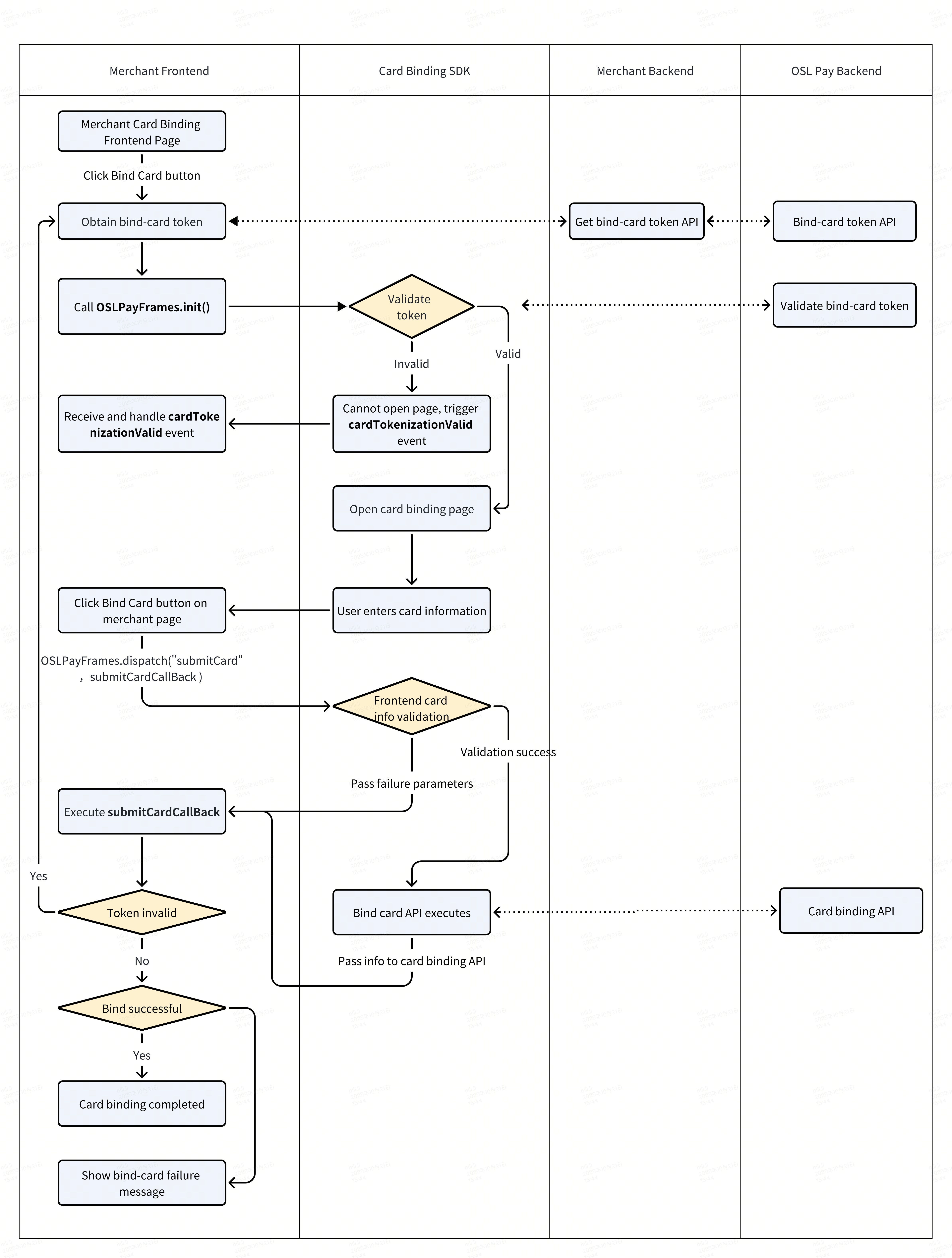
Integration example
Currently, native SDK is not supported. Apps must integrate using the web-based approach1.
<!-- sandbox -->
<script src="https://ramptest.osl-pay.com/js/op-frames.min.js"></script>
<!-- production -->
<script src="https://ramp.osl-pay.com/js/op-frames.min.js"></script>


<script>
  // initialization
  OSLPayFrames.init({
    boundCardToken: 'edb73993c42xxxca57b4b9db56', // Required: Card binding token
    locale: 'en', // Optional: Language setting, default is 'en'
    fields: { // Optional: Form field configuration
      phone: true
    },
    style: {}, // Optional: Custom style object (see style examples below)
    getContainer: function() { // Optional: Function to get the container element
        return document.querySelector('#oslpayFrame');
    }
    suppressedErrorCodes:'RS00510003',  // Multiple selections are allowed, separated by commas 'RS00510003, pluto_card_0331_10017'
    suppressErrors: false, // Optional: defaults to false
    businessType: 'BUY' // Optional: defaults to BUY
  });
</script>

<div id="oslpayFrame"></div>
Initialization method
init(options) – Initializes the SDK and creates/displays the card binding form
| Parameter | Type | Required | Description |
|---|---|---|---|
boundCardToken | String | Yes | The card binding token obtained from the API` |
locale | String | No | Language setting, default is 'en'. Supported values: 'en', 'zh-CN', 'zh-TW', etc. |
fields | String | No | Form field configuration (see table below) |
style | Object | No | Custom style object |
getContainer | function | No | Function to get the container element; default is #oslpayFrame |
| suppressedErrorCodes | string | null | No | When an error code returned by the bind card API is in this list, the SDK will not display an error toast notification. |
| suppressErrors | boolean | No | Set to true to disable error toast messages triggered by SDK card update requests |
| businessType | string | No | BUY: Bind card to buy crypto, SELL: Bind card to sell crypto. Defaults to BUY |
No#Fields configuration:
| Parameter | Type | Required | Description |
|---|---|---|---|
phone | boolean | false | Phone number |
Event method
addEventHandler(eventName, callback) – Adds an event listener
| Parameter | Type | Description |
|---|---|---|
eventName | Name of the event. Use constants from OSLPayFrames.Events | |
callback | function | Callback function to handle the event |
Example:
// Listen for card token validation result
OSLPayFrames.addEventHandler(OSLPayFrames.Events.CARD_TOKENIZATION_VALID, (data) => {
  if (data.isValid) {
    console.log('Token validation successful, form is displayed');
  } else {
    console.error('Token validation failed');
  }
});

// Listen for form validation status changes
OSLPayFrames.addEventHandler(OSLPayFrames.Events.CARD_VALIDATION_CHANGED, (data) => {
  console.log('Form validation status:', data.isValid);
});

// Listen for field focus
OSLPayFrames.addEventHandler(OSLPayFrames.Events.CARD_FIELD_FOCUS, (data) => {
  console.log('Field focused:', data.fieldName);
});

// Listen for field blur
OSLPayFrames.addEventHandler(OSLPayFrames.Events.CARD_FIELD_BLUR, (data) => {
  console.log('Field blurred:', data.fieldName, 'Current value:', data.value);
});
removeEventHandler(eventName, callback) – Removes a specific event listener
Example:
const handler = (data) => {
  console.log('Form validation status:', data.isValid);
};

OSLPayFrames.addEventHandler(OSLPayFrames.Events.CARD_VALIDATION_CHANGED, handler);
// 稍后移除
OSLPayFrames.removeEventHandler(OSLPayFrames.Events.CARD_VALIDATION_CHANGED, handler);
removeAllEventHandlers(eventName) – Removes all listeners for a specific event
Example:
OSLPayFrames.removeAllEventHandlers(OSLPayFrames.Events.CARD_VALIDATION_CHANGED);Control methods
dispatch(eventName, callback) – Triggers an internal SDK event and receives the result
| Parameter | Type | Description |
|---|---|---|
eventName | string | Name of the event |
callback | function | Callback function to receive the event result |
// Submit the card binding form
OSLPayFrames.dispatch(OSLPayFrames.Events.CARD_SUBMIT, (result) => {
  if (result?.status) {
    console.log('Card binding successful, Card ID:', result.cardId);
  } else {
    console.error('Card binding failed:', result?.error);
    if (!result?.tokenValid) {
      console.error('Card binding token is invalid, please obtain a new one');
    }
  }
});

// Reset the form
OSLPayFrames.dispatch(OSLPayFrames.Events.CARD_RESET_FORM, () => {
  console.log('Form has been reset');
});

// Get form validation status
OSLPayFrames.dispatch(OSLPayFrames.Events.CARD_IS_VALID, (result) => {
  console.log('Is form valid:', result?.isValid);
});
Submit result:
| Parameter | Type | Description |
|---|---|---|
status | boolean | Whether the card binding was successful |
cardId | string | Card ID returned upon successful binding |
tokenValid | boolean | Whether the card binding token is valid |
error | object | Error information (returned if binding fails) |
Available events
The SDK provides the following event constants (accessible via OSLPayFrames.Events):
| Event Name | Constant | Description |
|---|---|---|
CARD_TOKENIZATION_VALID | 'cardTokenizationValid' | Card token validation result |
CARD_VALIDATION_CHANGED | 'cardValidationChanged' | Form validation status changed |
CARD_FIELD_FOCUS | 'cardFieldFocus' | Field focused |
| CARD_FIELD_BLUR | 'cardFieldBlur' | Field blurred |
Triggerable events
The following events can be triggered via the dispatch method:
| Event Name | Constant | Description |
|---|---|---|
| CARD_SUBMIT | 'submitCard' | Submit the card binding form |
CARD_RESET_FORM | 'resetForm' | Reset the form |
| CARD_IS_VALID | Get form validation status | Field focused |
Custom style object structure
const customStyle = {
  backgroundColor: '#FFF',              // Background color
  padding: '20px 16px',                 // Padding
  itemMarginBottom: '20px',             // Margin between form items
  input: {
    color: '#040B0F',                   // Input text color
    tertiaryColor: '#8e8e92',           // Secondary text color
    backgroundColor: '#F2F4F5',         // Input background color
    fontSize: '15px',                   // Font size
    height: '46px',                     // Height
    padding: '12px',                    // Inner padding
    rounded: '10px',                    // Border radius
    border: 'none'                      // Border
  },
  label: {
    color: '#2A373D',                   // Label color
    fontSize: '14px',                   // Font size
    paddingBottom: '6px'                // Bottom padding
  },
  focus: {
    color: '#252629',                   // Text color on focus
    border: '1px solid #00f'            // Border on focus
  },
  invalid: {
    color: '#9a1313',                   // Invalid state text color
    fontSize: '14px',                   // Font size
    padding: '10px',                    // Padding
    border: '1px solid #f00'            // Border
  },
  placeholder: {
    color: '#B6BEC2'                    // Placeholder text color
  },
  select: {
    options: {
      activeBackgroundColor: '#F2F4F5', // Active option background
      fontSize: '14px',                 // Font size
      height: '36px'                    // Option height
    }
  },
  message: {
    backgroundColor: '#ffffff',         // Message background color
    border: '1px solid #eaeaed',        // Border
    textColor: '#252629',               // Text color
    iconColor: '#f59e0b',               // Icon color
    borderRadius: '12px',               // Border radius
    padding: '16px',                    // Padding
    fontSize: '14px',                   // Font size
    boxShadow: '0 4px 12px rgba(0, 0, 0, 0.1)' // Box shadow
  }
};
FAQ
Q: The iframe element embedded in the page has a default border, which affects the overall visual design consistency. How should this be handled?
A: The iframe element has a default border style in all browsers. To achieve more precise visual control, it is recommended to manage this consistently using CSS style overrides:
/* Globally remove border */
iframe {
border: none;
}

/* Or use a class to control */
.no-border-iframe {
border: none;
}
Updated 3 months ago